
12 form sources, covered by one switch
Contact forms, login, registration, comments and checkout — plus anything else, by CSS selector.
50% OFF Launch offer on every CaptchaFlow Pro plan — first 50 customers.
Grab the DealCaptchaFlow Pro
The first 50 customers get every Pro plan at half price — yearly or lifetime. On yearly plans the discount applies to every renewal, not just the first year.
Grab the DealOr try it free for 14 days — no card required.
All 59 of them — what each one actually does, and where to switch it on. No marketing word standing in for an explanation.
Contact forms, login, registration, comments and checkout — plus anything else, by CSS selector.
36
features in the free plugin — the whole of it, on as many sites as you like.
23
more, for sites where the spam has stopped being accidental.
Most spam never reaches the second gate, which is why protection this thorough costs so little on a real page.
A honeypot field no person can see, and a timer that knows a form filled in under two seconds was not filled in by hand. Nobody is asked to do anything.
Whatever you chose — Turnstile, reCAPTCHA, hCaptcha, or a self-hosted sum or question. The answer is checked on your server, never trusted from the browser.
Allow or block, with a reason code recorded either way — so when something is stopped you can see exactly which gate stopped it, and why.
Pick a group to jump to its full list — every entry there says what it does and which screen it lives on.
One plugin in front of every form on the site — including the ones you add later.
8 features 02Six ways to tell a person from a bot, each explained in plain terms before you pick.
8 features 03Spam that never sees a CAPTCHA, caught before it costs a visitor anything.
6 features 04Built so you can tell, at a glance, that it is working.
7 features 05Privacy-first by default, not as a paid extra.
5 features 06For sites past the point where a CAPTCHA alone is enough.
9 features 07For stores, and for anyone who wants to know what is going on.
9 features 08For people running this on more than one site.
7 featuresThe front-end script is dependency-free and only loads on pages that actually have a form. Log writes are deferred to the end of the request, so nothing a visitor waits on is spent on bookkeeping.
Read the docs2.6 KB
of JavaScript on the front end, gzipped
≤ 5 ms
added to a submission by verification
244
automated tests across Free and Pro
One plugin in front of every form on the site — including the ones you add later.
8 features · 8 free

A single switch that puts protection in front of every form CaptchaFlow can find, and keeps covering new ones automatically.
Where: Forms → “Protect every form CaptchaFlow can find”. This is the recommended setup and the only step most sites ever need.
Turn protection on or off for one form source at a time when a blanket rule is too blunt.
Where: Forms → switch off “protect all”, then toggle each source individually.
Use a different challenge on different forms — an invisible check on checkout, a visible one on comments.
Where: Forms → open a source and pick its provider. Leave it on “default” to follow the site-wide choice.
Choose where the challenge appears in a form: the theme’s natural spot, just before the submit button, or at the very end.
Where: Forms → per-source “placement”. Useful when a theme puts the submit button somewhere unusual.
Login, registration, password reset and comments are covered out of the box — the four forms every WordPress site has.
Where: Protected as soon as you finish the wizard. Nothing to install per form.
Contact Form 7, WPForms, Fluent Forms, Forminator, Ninja Forms, Gravity Forms and Elementor Pro Forms, each with a proper adapter rather than a generic hack.
Where: Detected automatically. The Forms screen lists what it found and how many forms each one has.
The customer login and registration forms, which are where credential-stuffing attacks land on a store.
Where: Detected automatically when WooCommerce is active.
Protects hand-built, custom or unsupported forms by matching them with a CSS selector.
Where: Forms → “Other forms (by CSS selector)” → enter something like form.my-signup.
Six ways to tell a person from a bot, each explained in plain terms before you pick.
8 features · 8 free

Free, privacy-friendly and usually invisible — most visitors never see a puzzle. No Google account.
Where: Provider → Turnstile → paste the site and secret keys, then press Test to confirm they work.
The familiar “I’m not a robot” checkbox. Widely recognised by visitors, but it costs them a click.
Where: Provider → reCAPTCHA v2 → paste your keys.
Invisible scoring with no click at all. You choose how suspicious a visitor has to be before they are stopped.
Where: Provider → reCAPTCHA v3 → paste keys and set the score threshold (0.5 is a sensible start).
A privacy-focused checkbox challenge, and the usual choice for sites avoiding Google services.
Where: Provider → hCaptcha → paste your keys.
A simple sum the visitor answers. No account, no external service, and no visitor data leaves your site at all.
Where: Provider → Math. There is nothing to configure and nothing to sign up for.
Questions you write yourself, such as “What colour is our logo?” — very effective when your visitors share some common knowledge.
Where: Provider → Question → add your own question and answer pairs.
Match the challenge to your theme: light, dark or automatic, normal or compact, and a specific language if you want one.
Where: Provider → widget options. “Auto” follows the visitor’s own system preference.
Runs the check silently and only interrupts a visitor when something actually looks wrong.
Where: Forms → per-source “invisible”, for providers that support it.
Spam that never sees a CAPTCHA, caught before it costs a visitor anything.
6 features · 6 free

An invisible field that people never fill in and simple bots always do. Costs a real visitor nothing.
Where: Always on. The field name changes per request, so it cannot be learned and skipped.
Rejects anything submitted faster than a human could possibly have read the form.
Where: Always on, with a two-second floor. Adjustable in code via a documented filter.
Every protected form carries a signed token, so a submission that has been edited or replayed is rejected outright.
Where: Automatic. Nothing to configure.
A solved challenge can be used exactly once, so a captured submission cannot be sent a thousand times.
Where: Automatic, with expired claims cleaned up nightly.
No visitor-specific data is ever written into your page HTML, so page caching cannot serve one visitor another visitor’s challenge.
Where: By design. Tools → Diagnostics confirms it is working through your caching plugin.
If the CAPTCHA provider is unreachable, your forms keep working and the local checks take over — an outage at Google never takes your contact form down.
Where: Settings → “Fail open when the provider is down”. On by default; switch it off to fail closed instead.
Built so you can tell, at a glance, that it is working.
7 features · 7 free

Takes a fresh install to a protected site in under a minute, and finishes by fetching a real challenge to prove it works.
Where: Runs on activation. Tools → “Relaunch the wizard” to go through it again; nothing changes until you finish.
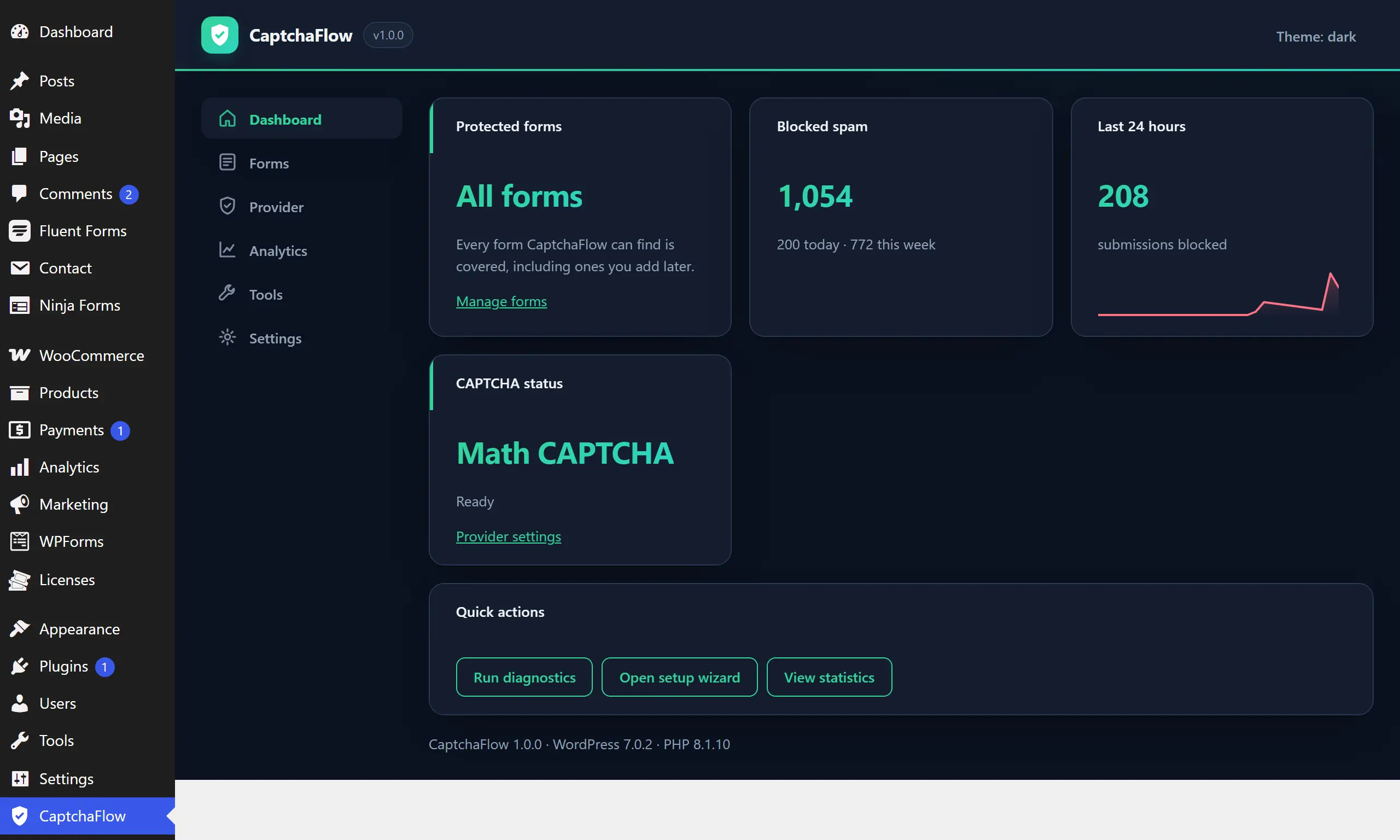
Blocked-spam totals for today, this week and this month, a 24-hour trend, what is protected, and which challenge is live.
Where: The first screen you land on.
Checks your environment, provider, REST API, scheduled tasks and known plugin conflicts — and tells you how to fix anything it finds.
Where: Tools → Run diagnostics. “Export report” produces a support-ready text file that contains no keys or secrets.
Confirms the challenge actually renders on your pages with your theme, rather than leaving you to find out from a customer.
Where: Tools → Theme compatibility.
Every decision recorded with the reason it was made, so you can prove what happened when somebody says their message never arrived.
Where: Kept automatically. Settings → retention controls how long, from 1 to 365 days.
The whole admin follows your system preference, or you can pin it light or dark.
Where: The theme toggle in the plugin header.
Decide whether removing the plugin also removes its data. Off by default, so nothing is destroyed by accident.
Where: Settings → “Delete all CaptchaFlow data when the plugin is uninstalled”.
Privacy-first by default, not as a paid extra.
5 features · 5 free

Shortens visitor addresses to the network they came from before storing them — enough to spot a flood, not enough to identify a person.
Where: Settings → “Shorten visitor IP addresses in the log”. On for new installs.
The log can recognise a repeat submitter without ever holding their address in the clear.
Where: Automatic. There is no setting because there is no reason to store the address.
Writes suggested policy wording that describes your actual configuration — a self-hosted site is correctly told nothing leaves it.
Where: Settings → Privacy → Policy Guide, where WordPress collects suggested text from all your plugins.
Visitor data requests cover the spam log automatically. Erasing strips the address and IP but keeps the anonymous record, so your statistics stay honest.
Where: Tools → Export Personal Data / Erase Personal Data, as normal.
Nothing is sent to us, ever. There is no account, no phoning home and no usage tracking.
Where: Nothing to switch off, because there is nothing running.
For sites past the point where a CAPTCHA alone is enough.
9 features · 0 free

Caps how often one visitor can submit, so a script cannot hammer a form even with a valid challenge.
Where: Pro → Security → set attempts and a window. Offenders get a temporary block that lifts by itself.
Block or always-allow specific addresses and ranges, with a hit counter showing which rules are earning their keep.
Where: Pro → Firewall → add a rule. Allow rules skip the challenge entirely for trusted offices or partners.
Block or allow whole countries, either as a blocklist or an allow-list for sites that only trade in a few markets.
Where: Pro → Firewall → country mode. Uses a local geo database, so no lookup ever leaves your server.
Rejects throwaway addresses at signup, which is where most fake accounts start.
Where: Pro → Email validation → on. Ships with a bundled domain list and needs no external service.
Catches obviously invalid phone numbers before they reach your CRM.
Where: Pro → Phone validation → on, optionally with a default region.
Scores each submission on its content and behaviour and blocks the ones over your threshold — catching spam that solved the CAPTCHA.
Where: Pro → Scoring → set a threshold. The score is recorded on every log entry so you can tune it with evidence.
Watches for the signs of a human filling a form — movement, focus, typing — and treats a submission with none of them as suspect.
Where: Pro → Behaviour → on. Collected in the browser and summarised; no keystrokes are recorded or sent.
Your own if-this-then-that rules: block a source, trust a country, require a challenge only above a score.
Where: Pro → Rules → build a condition and choose an action.
Show a challenge only to visitors who need one, so regulars and trusted countries sail straight through.
Where: Pro → Rules → a trust action. The challenge is never even issued for a trusted visitor.
For stores, and for anyone who wants to know what is going on.
9 features · 0 free

Protects WooCommerce checkout invisibly by default, because nothing should stand between a customer and paying you.
Where: Pro → Commerce → on. Visible challenges are opt-in on checkout for exactly that reason.
Review forms are handled by the commerce adapter rather than the generic comment one, so they are protected once and not twice.
Where: Automatic when commerce protection is on.
Throttles repeated payment attempts, which is how stolen cards get tested against a store.
Where: Pro → Commerce → card testing.
Trends over time, plus breakdowns by form, country, reason and hour of day, and a CSV export for anything deeper.
Where: Pro → Analytics. Charts are drawn from your own data with no charting service involved.
Filter the activity log, open any entry for the full detail, export it, or erase everything for one email address.
Where: Pro → Logs.
Emails you when spam suddenly jumps, with a cooldown so an attack does not also flood your inbox.
Where: Pro → Alerts → set an address and a threshold.
A regular summary of what is protected, what is not, and anything diagnostics found — for sites you look after but do not look at daily.
Where: Pro → Alerts → health report.
Reads your own traffic and suggests specific improvements, each with a one-click apply and a plain explanation of why.
Where: Shown on the dashboard. Advice only appears when your data actually warrants it.
Applies only the safe recommendations for you, and never anything that could turn a real customer away.
Where: Pro → Optimizer → on. Every change it makes is logged with the reason.
For people running this on more than one site.
7 features · 2 free

Replace the plugin’s name and branding with your own, so clients see your agency rather than ours.
Where: Pro → White label.
Configure once for a whole network instead of site by site.
Where: Network Admin → CaptchaFlow.
Read statistics and logs, manage firewall rules, or verify a submission from your own code, using scoped API keys.
Where: Pro → Developer → create a key and choose its scopes. A key can never exceed the permissions of whoever created it.
Push verification events to your own systems, signed so you can prove they came from your site.
Where: Pro → Developer → Webhooks. HTTPS and public addresses only, checked at delivery time.
Move a tuned configuration from one site to the next instead of rebuilding it by hand.
Where: Pro → Tools → Export / Import.
Protect a custom form in a few lines, or change almost any decision the plugin makes, using a documented and versioned public API.
Where: See the developer documentation — 17 documented hooks and a full custom-form guide.
Check status, test your provider, run diagnostics and verify submissions from the command line or a deploy script.
Where: wp tscf status | test | diagnostics | verify
The whole admin follows the colour scheme you already chose in your WordPress profile. Nothing to configure, nothing that glares at 1am.
Everything in the Free column is free forever, on as many sites as you like. Pro is there when you need it, not before.